An introductory offer lets new members pay a lower price for their first months. After that, they pay the plan's regular price automatically. You don't need a separate discount plan: members join your real plan and stay on it.
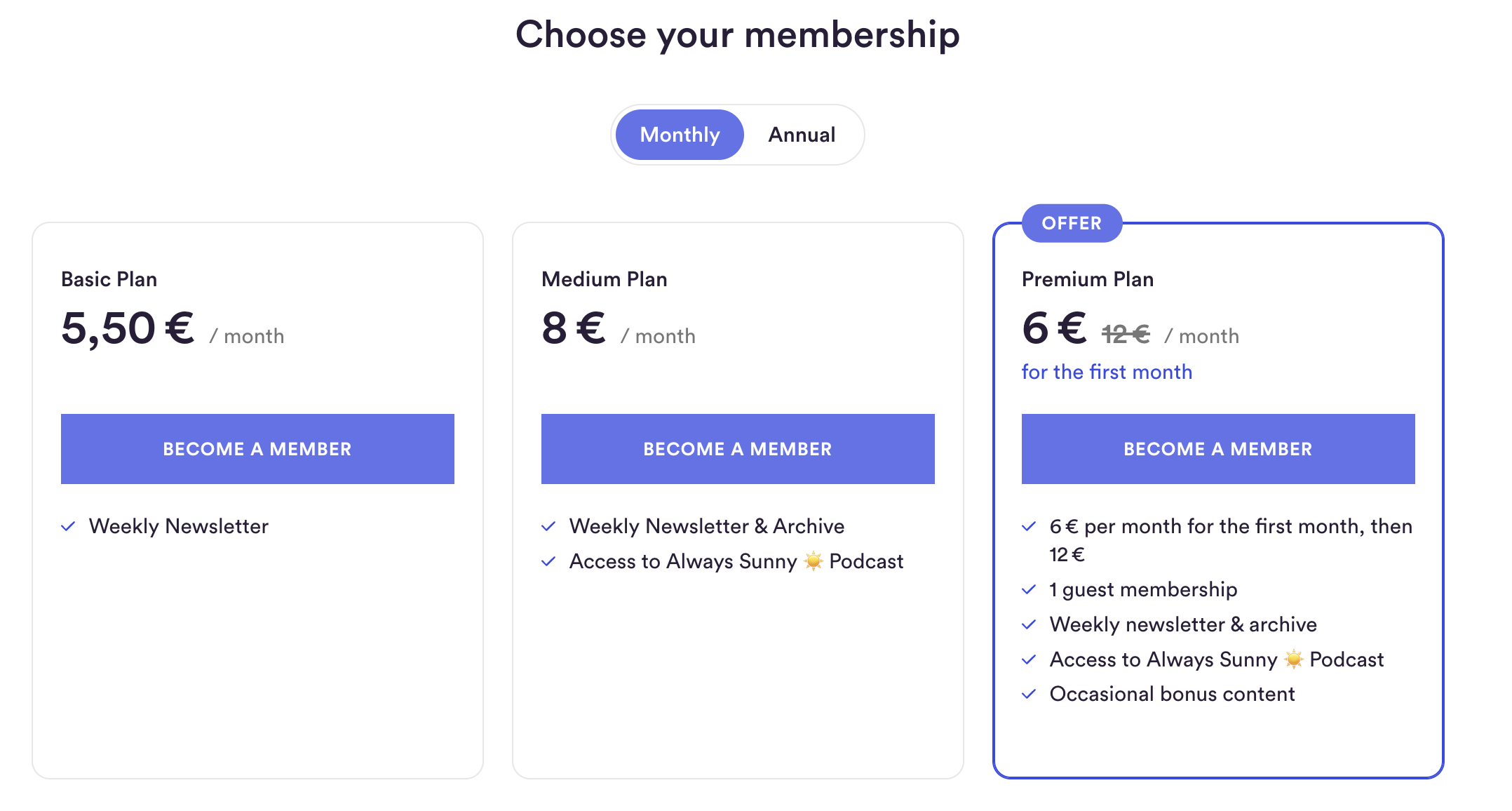
You set the offer per plan. Each plan can have one offer for its monthly membership and one for its annual membership. You choose a lower price per month and how long it lasts, from 1 to 12 months.
The regular price starts on its own. Members don't need to do anything, and you don't need to change anything. Members can also cancel the subscription before it renews at the higher price.
Members always see what they'll pay. Your plan card shows the offer price, the regular price crossed out, and how long the offer lasts. The welcome email and members backend repeat the offer price, the regular price and the date it starts.
Annual memberships are paid a year in advance. The first year combines the offer months and the regular months. For example, 3 months at €3 and 9 months at €4 makes €45 for the first year. After that, members pay the regular annual price. Members are reminded by email before the renewal.
New members, and former members who have never used an offer. Each person can use one introductory offer per publication, ever. This applies across all your plans, visible and hidden.
Can use an offer: people who've never been a member, free members and guests when they choose to upgrade, former paying members who paid the regular price, and former trial, guest or free members.
Can't use an offer: current paying members (incl. those still in trial), and anyone who has already used one of your offers, even if they've since cancelled.
People who can't use the offer see your regular price. If they clicked on an offer, the checkout tells them that the offer is for new members only.
Go to the plans page in your publisher area and open the plan you want to edit.
In the pricing section, switch on the introductory offer for the monthly plan, the annual plan or both.
Enter the offer price per month and choose how many months it lasts.
Check the summary under the offer and the preview of your plan card. They show exactly what new members will pay.
Save the plan.
The offer is live immediately, wherever the plan appears. To end it, switch off the introductory offer and save.
Show one introductory offer at a time, on one plan. One clear deal is easier to choose than several discounts side by side. When visitors have to compare offers, they're more likely to hesitate and leave without deciding.
Steady helps with this: when only one plan shows an offer, that plan card gets a highlighted border, so it stands out right away. With two or more offers, the highlight goes.
Good choices for your one visible offer:
Your most popular plan, to make the step to joining smaller
Your annual plan, if you want members to commit for longer
For everything else, put the offer on a hidden plan. Hidden plans don't appear on your Steady page or in the checkout on your website, but anyone with the link can join. That way your public page stays simple, and you decide who sees which deal.
Hidden offers work well for:
Winning back former members: send the link in an email to people who have cancelled.
Special audiences: newsletter subscribers, podcast listeners, people at an event.
Partnerships and campaigns: a deal for a partner's community or a link in a specific campaign.
How to set it up: create a new plan (or duplicate an existing one), switch on the introductory offer, then hide the plan. To share it, open the menu on the plan's row in your plans table and choose Share. This copies the plan's link.
⚠ Good to know for winback campaigns
Each person can use only one introductory offer per publication, ever. Former members who joined through one of your offers before can't use a winback offer. They'll see the regular price.
A winback offer reaches former members who paid the regular price or had a free trial. Keep this in mind when you decide whether to show an offer publicly: every visible offer uses up the one offer of everyone who takes it.
A member gets either an offer or a free trial, never both. When someone joins with an introductory offer, they pay the offer price right away. Plans without an offer keep your free trial as usual. Learn more about free trials.
Changing an offer only affects new members. Members who already joined with an offer keep the terms they signed up for, even if you change or switch off the offer.
Changing plans ends the offer. If a member switches to another plan, they pay that plan's regular price. The offer doesn't move with them or start again.
You can see who's on an offer. In your member list, members in their introductory period are marked.
A plan whose offer has been used can't be deleted. Archive it instead. Learn how to archive, change or delete plans.
Price increases still work. If you increase your plan prices, members on an offer move to the new regular price when their offer ends.
If anything's unclear, email us at [email protected]. We're happy to help.