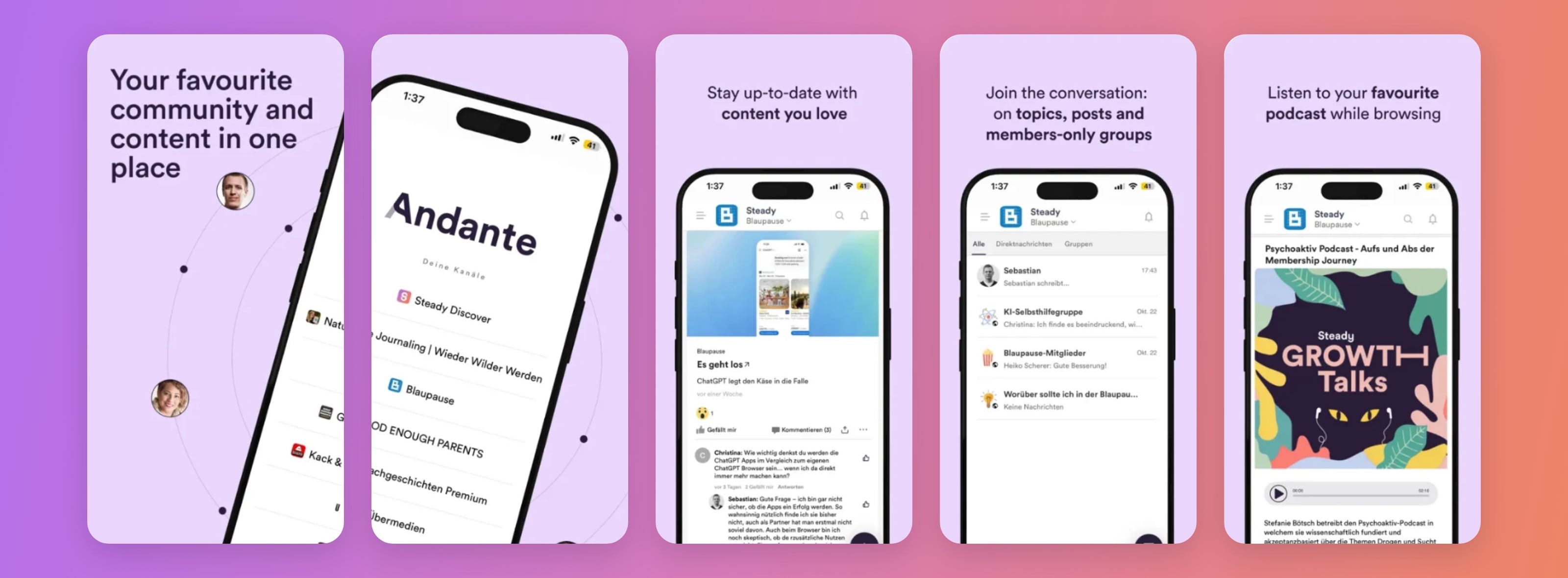
Andante is Steady's community app, a mobile app that brings your paying members together in one space to connect, chat, comment and engage more deeply with your work. It makes community a core part of your membership programme and makes it easy for you to interact with your members.
In the app, members can:
Read posts and listen to podcasts
Join chats and discussions
Send direct messages to you and to other members
Discover content recommended by real people, not algorithms
Keep up with everything they support, all in one place
Only members with a paid membership of a participating publication can access that publication in the app. Users without an active paid membership see the Steady Discover channel, which shows curated content from Steady on different topics.
If you have an active project on Steady and want to be part of Andante, request access at andante.community.
Once your project is in the app, you have special rights for your publication there. For example, you can post content on all tabs of your publication. Further admin rights are still being defined, and we're always happy to hear what you'd like to be able to do.
Bottom navigation: you can add these optional items (with the matching content for each screen):
Podcasts: needs at least one podcast RSS feed to show on that screen.
Social feed: needs a social media feed, for example Instagram. We can rename this item to a name of your choice (up to 12 characters).
Community forum: needs one topic in which members can post. You choose the name (up to 12 characters), and whether forum content also appears in your Posts feed.
Topics: besides the topics you use on Steady, we can add more topics in the app. You also decide the order of the topics on the Topics screen.
Group chats:
decide whether you want group chats
if you do, you set them up yourself – see “Set up group chats” below
Content that's added to the app automatically – see “Can I control which content appears in the app?” below.
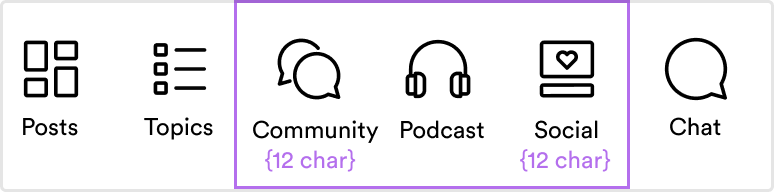
This is the bottom navigation. The items in the purple box are optional; the names of the Community and Social screens can be customised.
Removing these bottom navigation items:
Posts
Topics
Chat
Icons in the bottom navigation
Fonts or any other part of the app's design. We're always happy to hear your feedback, but changes apply to the whole app.
Group chats are where your members talk to each other and to you. As the admin of your publication, you create them yourself – you decide how many there are and what they're about.
Open Andante in your browser, log in with your Steady account and switch to the admin area (see “Is there a web version of the app?” below).
Go to Chats.
Click the + in the top right corner and choose Group chat.
Fill in the details in Create new group chat:
Add picture: an image for the chat
Name: up to 160 characters
Purpose: what the chat is for, up to 200 characters. Members see the name, picture and purpose before they join.
Chat level: keep Channel.
Access type: change Private to Public, so all members of your publication can find and join the chat. A private chat is only for the people you add.
Optionally, search for people to add straight away.
Click Open chat. That's it.
The chat then also appears in the iPhone and Android apps. Members who haven't joined yet see an invitation to join at the top of the Posts page.
edit the chat's picture, name and purpose
add or remove members
delete any message
make other members chat admins, for example someone from your team
ban members or make them read-only, so they can read but not write
To make someone a chat admin, open the chat, click the info icon and then Participants. Click the three dots next to the person's name and make them an admin. If they aren't in the chat yet, add them first with Add member.

Download the Andante app.
Log in with the email address they use on Steady and enter the verification code.
Start reading and taking part in your community.
Members with several memberships see all their channels in the menu on the left.
We'll give you a template post you can send to invite your members to the app.
Yes. It can make it easier for you to create content and reply to comments and messages from your computer. Once your publication is live in the app, you'll find the web version at:
Only members with a paid membership of your publication can access your project in the app. Users without an active membership of a project in the app see the Steady Discover channel, which shows curated content from various Steady projects.
Written content in the app, such as a Steady post, opens in a browser inside the app. There, members still see a paywall if the post is only for higher-priced plans.
Yes. You choose which content is added to the app automatically:
Steady posts (via RSS feed): all posts you publish on Steady appear in the app. If you use topics on Steady, your posts are sorted into them.
Other articles (via RSS feed): you choose the topic the articles from this feed appear under. The app can't sort one feed into several topics.
Podcasts (via RSS feed): we can add one or more podcasts to your channel. Every podcast in the app is available to all your paying members – access can't differ by plan.
Instagram or another social media feed.
You can also create content directly in the app or the web version.
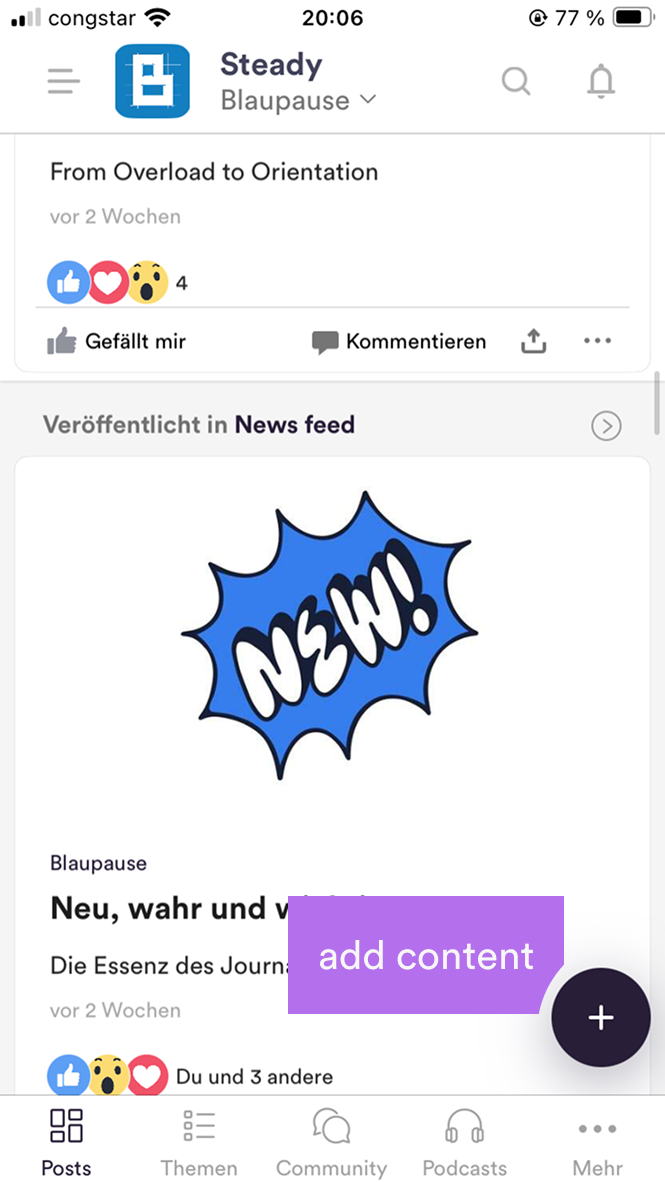
Wherever you see the + in the bottom right corner of the app, you can add new content.
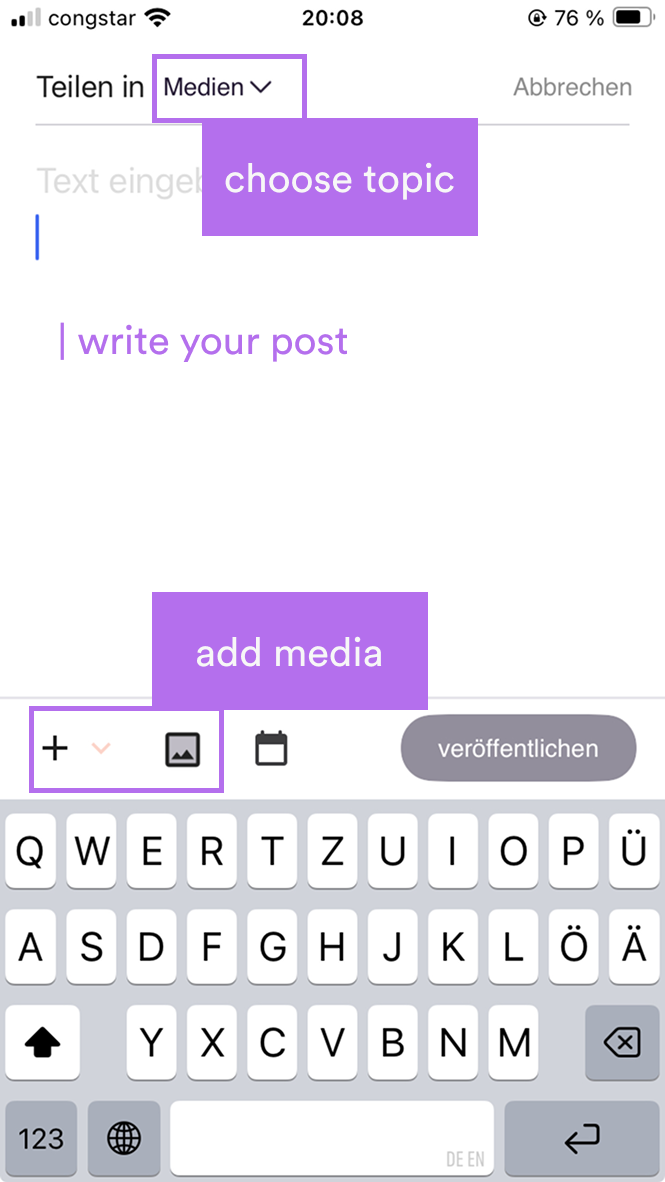
Choose the topic the content should appear in, write your post and add media such as videos, images, PDFs or links. You can also schedule content to appear later.
Every user can delete content they created. As an admin, you can also delete content created by others.
Yes. Members can keep browsing, take part in discussions or even minimise the app while they listen.
Not quite. All features in the app are available to all paying members. When a member opens a post in the app, it opens in the in-app browser; if their plan doesn't include that post, they see a paywall.
All podcast episodes in the app are available to all paying members. So it may not make sense to add a premium podcast feed that's only meant for higher-priced plans.
No. You decide which group chats exist, and any member can join them. Members can send direct messages to any other member who has downloaded the app and logged in.
Not at the moment. We plan to make this possible as the app rolls out more widely.
The forum gives your members a place to post content themselves – videos, images, links, PDFs or simply their thoughts. How it differs from group chats:
Community forum | Group chats | |
Members can start | Posts | Messages |
Everyone can reply | Yes | Yes |
Threads for more orderly discussions | Yes | – |
Tags on posts | Yes | – |
Images, videos, PDFs and links | Yes | – |
Searchable | Yes | – |
What you decide:
whether you want a community forum, i.e. a topic where members can post (if yes, it's pinned to the bottom navigation)
what it's called (up to 12 characters)
whether forum content also appears in the Posts feed
We get an email about reported content and remove it if it breaks Steady's guidelines.