The registration wall goes live on 8 October 2026.
The paywall gates or hides premium content from readers without access.
When you include a paywall, this cannot be closed or dismissed by the reader. A reader must either log in, purchase a paid membership plan or unlock one post as a free member.
We previously offered both a soft and a hard paywall. Our data showed that the hard paywall converts 40x more users than the soft paywall. For this reason, we decided to remove the soft paywall option.
There are several alternatives to convert less committed readers:
Offer a free trial. Readers try a paid plan for 7 or 30 days before they pay anything. On the wall, the trial card is the first thing they see, so the step from reading to trying is one click. See How to offer trial memberships.
Turn on the registration wall. Readers who aren't ready to pay unlock the post they're reading by becoming a free member, once per person. They keep reading, and you gain a member you can reach by email and who is one click away from a paid plan. See The registration wall below and Everything about free memberships.
Remove the paywall and show a dismissible announcement or newsletter layer instead. The announcement layer can serve as a soft prompt to support you; the newsletter layer is an overlay to convert readers into free members.
After successful login, purchase or unlock, the reader is always returned to the post to continue reading.
You can see a preview of your paywall on the paywall settings page or by opening a paywalled post in incognito.
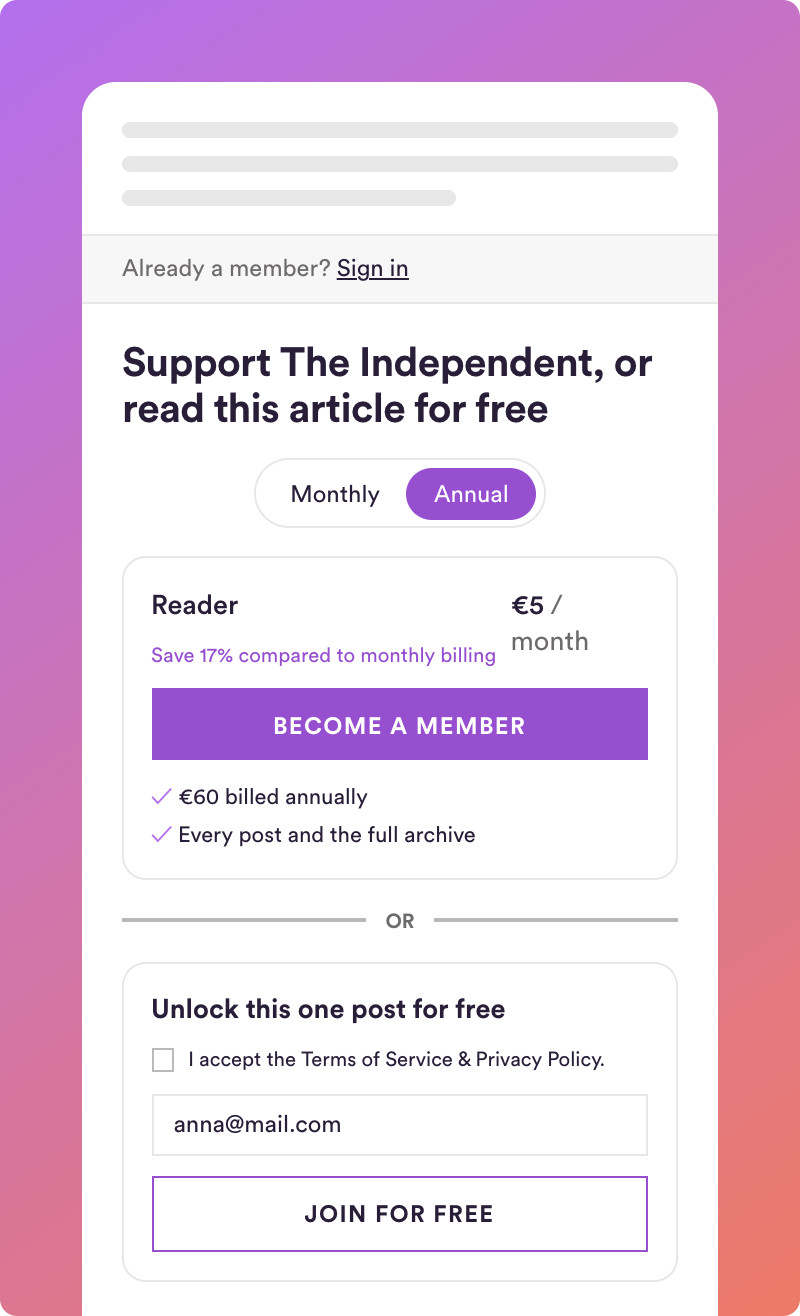
A visitor who reaches your paywall sees, top to bottom:
"Already a member? Sign in", so that members who have an active membership can sign in to unlock the paywalled content.
Your headline. Your tone of voice to prompt readers to support you.
Your membership plans, with the benefits you define. Readers don't need to leave the paywall to choose a plan that suits them. After purchase, they return to the same post.
The free unlock, if the registration wall is on: unlock this one post by becoming a free member.
You define the headline in your Paywall settings, up to 60 characters. Industry best practice for a hybrid pay/registration wall suggests to:
Start with continuation ("Keep reading"), not a block ("You've hit a wall", "Members only").
Put the free option in the headline itself.
Frame paid as support, not payment.
The wall shows the plans that are visible on your Steady page. Hidden plans stay hidden. In Steady posts where you've restricted access to certain plans, the wall shows only the plans that unlock that post. You manage plans, prices and benefits under Plans & Pricing; changes appear in the paywall immediately.
Your plan cards are what convinces readers to join. Keep their benefits short and concrete. Also bear in mind not to offer too many plans to avoid decision fatigue from too many options.
On phones, the paywall and the checkout show your plan cards without their images, so the plan price and benefits are more visible and to allow the user to more easily compare different plans. On desktop the images stay.
With the registration wall switched on, a visitor can unlock the post they're reading by becoming a free member of your publication. This works once per person (or rather email). Everything else stays reserved for paying members, and you gain a free member you can reach by email.
What visitors see. They enter their email address in the free option and confirm via the link we send. The post unlocks in the tab where they were reading, on any device, and they receive the link by email as well.
Who can use it. Only people who have never had a membership with your publication. Existing free members, paying members and former members see your plans only. After the one unlock, the paywall shows plans only for that reader, too.
Where it appears. On every paywalled post on Steady and on every article on your website with the regular paywall. The compact paywall for single elements (option 3 in the embed instructions) has no free unlock.
For your whole publication: in your paywall settings, switch off the registration wall. Your paywall then shows your plans only.
For a single post on Steady: open the post's publishing settings and, under Access, uncheck "Visitors can unlock this post by becoming a free member".
For a single article on your website: Add the attribute to the paywall snippet:
<div id="steady_paywall" style="display: none;" data-registration-wall="false"></div>
The new member appears in your members list as a free member, receives your posts by email like every other free member, and can upgrade to a paid plan at any time. Their access to the unlocked post stays as long as they are a free member.
If you set up your paywall before September 2026, three things are different. Here is what changed and why.
Your plans show inside the paywall. The button that led to a separate plans or checkout page is gone; readers choose a plan right where they stopped reading and return to the post after purchase. We compared both ways over 13 weeks in summer 2026: showing plans inside the paywall converted just as well as sending readers to a separate page (0.85 vs 0.82 paid memberships per 1,000 paywall views). Since neither way converts better, we kept the one that keeps readers on your post, and we now have one paywall for every publication, which lets us test and improve it for everyone. The free option of the registration wall also needs to sit right next to your plans.
The paywall keeps your headline. Description, benefits, button text and image are no longer part of it; your plan cards carry the benefits. One headline and your plan cards is what readers need to decide.
The paywall can't be closed. Until September 2026 you could choose a soft paywall that readers could dismiss, or a hard one that stays up. Over the same 13 weeks, hard paywalls turned about 40 times more readers into paying members per paywall view than soft ones (0.81 vs 0.02 per 1,000 views), and 84 percent of publications with a soft paywall didn't gain a single paying member from it. Readers who did join from a soft paywall paid at the same rate as those from a hard one, so the soft paywall didn't attract worse buyers; it just let almost everyone leave without deciding. For readers who aren't ready to pay, the registration wall now takes over that job, and you know who they are.
We'll keep working on the paywall to improve conversion, and your feedback shapes what we do next.
Can a reader unlock a second post via the registration wall? No. One post per person and publication. When a logged-in user hits the next paywall, they will just see the paid plans to upgrade.
Can I offer more than one free post? Not at the moment.
Can I change the text on the wall? Your headline, yes. The rest comes from your plans and Steady provides the unlock copy on the registration wall. We are committed to optimising the paywall conversions continuously.
I offer a free trial. What happens? The trial stays the first thing readers see; the free unlock is a smaller option beneath it.
I was using the soft paywall. What happens now? The soft paywall no longer exists. So that your readers weren't suddenly locked out, we switched off the paywall on your website on 30 September; your headline, plans and paywall markers are untouched. Paywalled posts on Steady use the hard paywall. You have three ways forward:
Switch your website paywall back on once the registration wall is live (8 October). Readers who don't want to pay unlock the post by becoming a free member and keep reading.
Use the announcement layer as a soft prompt for your membership that blocks nothing.
Take the paywall off posts everyone should read, by removing the paywall marker in the Steady editor or on your website.
I don't want free members at all. Switch off the registration wall in the paywall settings. Your paywall works as before, with your plans only.
Does the paywall look different on my website and on Steady? No. Same headline, same plans, same free option. Only the placement differs, see the two articles below.
Email us at [email protected] and we'll be glad to help.
Related articles